- Explain in your own words and examples, what is Shell Scripting for DevOps.
Kernel :
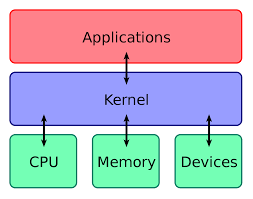
Kernel serves as a bridge between applications and the computer's hardware. It acts as an intermediary layer between the hardware and software, allowing applications to communicate with the hardware and access its resources.
The kernel is responsible for managing the computer's memory, processing tasks, and controlling input/output operations. It also manages system calls, which are requests made by applications to the operating system for access to resources such as files, network connections, or hardware devices.
Shell :
Shell is a user interface that allows users to interact with an operating system (OS) by entering commands and executing programs. It is a command-line interface that provides a way for users to interact with the system through a text-based interface.
Shells are typically used in Unix-like operating systems, such as Linux and macOS, and provide a powerful and flexible environment for system administrators, developers, and power users. Shells can be customized and extended using shell scripts, which are programs written in the shell's scripting language.
There are different types of shells, including the Bourne shell (sh), C shell (csh), Korn shell (ksh), and Bourne-Again shell (bash), which is the most widely used shell in Linux and macOS systems.

Linux Shell Scripting :
Shell scripting is a powerful tool for DevOps professionals that allows them to automate repetitive tasks, manage systems, and improve overall productivity. A shell script is a program that is written in a shell, which is a command-line interface used to interact with an operating system.
DevOps professionals use shell scripting to automate tasks that would otherwise need to be performed manually. For example, a shell script can be created to automate the deployment of an application, the configuration of a server, or the setup of a development environment. By automating these tasks, DevOps professionals can save time and reduce the potential for errors.
e.g, : Continuous Integration and Delivery (CI/CD): Shell scripts can be used as part of a CI/CD pipeline to automate the build, test, and deployment process. For example, a script can be created to run tests and deploy the application to a staging environment if the tests pass.
- What is #!/bin/bash?
#!/bin/bash is called the shebang line, and it is used to specify the interpreter for executing a shell script. In this case, #!/bin/bash indicates that the script should be executed using the bash shell, which is a popular shell for Linux and Unix-like operating systems.
- can we write #!/bin/sh as well?
#!/bin/sh can be used to specify the interpreter as the default system shell. This is often used when portability is a concern, as the sh shell is more widely available and is typically installed on most Unix and Linux systems.
- Write a Shell Script which prints I will complete #90DaysOofDevOps challenge.
To run this script, follow these steps:
Open a text editor, such as Nano or Vim, and paste the script into a new file.
Save the file with a .sh extension (e.g., devops.sh).
Make the script executable by running the command
chmod +xdevops.sh.Run the script by typing
./devops.shin the terminal.

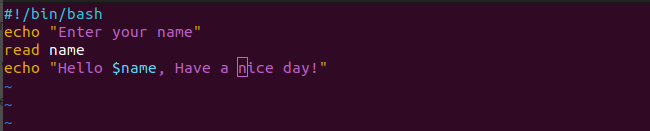
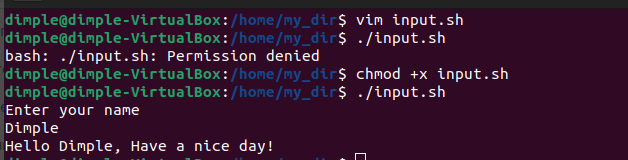
- Write a Shell Script to take user input, input from arguments and print the variables.
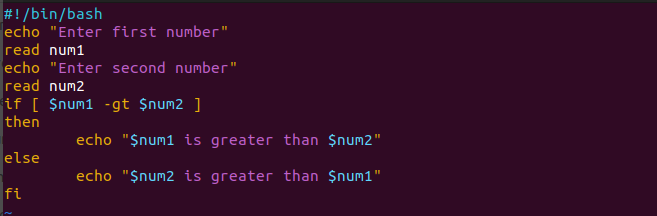
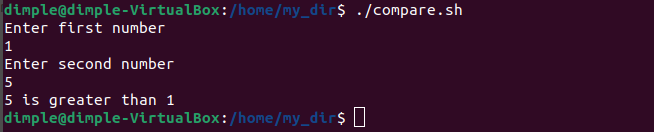
- Write an Example of If else in Shell Scripting by comparing 2 numbers
Was it difficult?